Another Code Camp

Spring is here (finally!) so it is time to go camping again – or perhaps at least the geek alternative. I’m doing another Code Camp, this time reprising my Silverlight for Business Applications presentation, with a few changes. It will be interesting to do this one considering everything that was just announced for Silverlight 3.0 (all of this is how you do it today, but if you wait until the new framework comes out, it will be a whole lot easier…)

Anyway, I have uploaded the presentation slide deck, materials, and my “script PDF.” The content is available for download here.

Note: I am posting this early, before I do my presentation, and will refine it later on today…I just don’t want to get into one of those “life happens” situations and neglect to push up the content in a timely manner…

Silverlight Demo Content Posted (Pt1)

The first of the New Hampshire Code Camp
Silverlight Demo content has been uploaded. The content includes the simple “Hello World” code, which is just a basic Silverlight page and project, as well as the associated auto-generated Web Project. The second project is the data access demo, which illustrates a data access layer (Linq to SQL), a WCF Service which provides access to the data access layer and returns a shaped version of the data in the DAL, and a Silverlight page which shows the data in a DataGrid.

The Silverlight page in the Data Demo also illustrates the use of the Silverlight Controls’
AutoCompleteBox to do client-side filtering of the retrieved data, as well as a Line Graph from the same library. One thing that has been added since the demo is a “swinging gate” technique to use an AutoResetEvent and a background thread to load the data for the graph, in order to avoid the latency seen in the UI when the graph was being arranged inline with keyboard entry in the AutoComplete box.  The DataDemo relies on the Products table in the AdventureWorks sample database, which can be downloaded here.  As I was using a named instance of SQL Server on my machine, some updates to the connection string may be necessary – the connection string is being kept in the web project’s web.config. file.

Also uploaded are the PowerPoint slide deck and a folder of links and slides which served as reference material used in preparing the presentation. (Near) future uploads will include the use of the ASP.Net Authentication Service from a Silverlight control, and interacting with HTML content (and jQuery) through the HTML bridge. Also in a subsequent upload will be interactive PDFs of the script content I used through the presentation.

To everyone (anyone?) who was waiting for this content, thank you for your patience.

The content is available here.

NH Code Camp Presentations – MMC 3.0 Development with .Net

OK…having shoveled and shoveled and shoveled out of today’s snowstorm, I can finally turn my attention to putting these presentations online. I’m going to start with the MMC Presentation in one shot, then do the Silverlight Presentation as a series of updates.

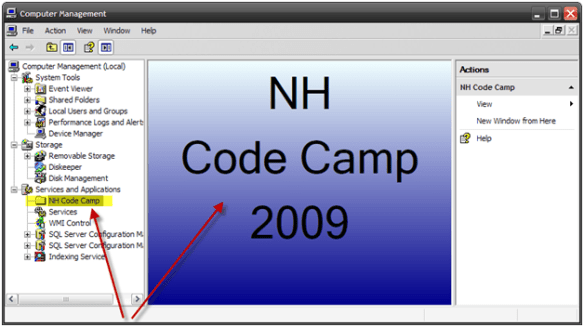
The focus of the presentation was using the MMC 3.0 API exposed in the Windows SDK to do what is pictured below – write content such as an administration tool and integrate it in a way that makes it look integrated into the Windows Shell.

Quite often, server-side components end up being managed through some hastily written application that is installed with as little integration as a presence in the Start Menu and perhaps a shortcut on the desktop.

So anyway, the presentation slides are here (I use SkyDrive for these because WordPress is not the best for file storage and retrieval):

Slides and Script

Code

Not that I use Mindjet MindManager for my presentation prep, which is where I keep my scripts. The output animated PDF reads much the same as the original…start at 12:00 and read clockwise around. The little “paper” icons are the topic notes – which house the text.


New Hampshire Code Camp

Wow have I been bad about (not) posting here. I just did the NH Code Camp yesterday (Saturday.) The event went very well, especially so considering it was the first one put on by Pat Tormey and the NH .Net User Group.

I gave 2 presentations – a refined version of the “Writing Custom Admin Consoles with .Net and MMC 3.0″ that I debuted at the last Boston .Net code camp, as well as a premiere version of a Silverlight 2.0 for business applications presentation. The first one had a whopping audience of 3 (one of whom was there because he was presenting in the same room after me), but the Silverlight presentation had a full room. I ran a bit long with the SL presentation, and my configuration for the ASP.Net membership service blew up, but overall I think it went OK (I still need to get the review sheets to know for certain.) I will likely be revising & reprising the Silverlight presentation next month at Boston.Net’s next code camp.

Unfortunately, I was not able to get my presentations up today, but I will be putting them up through the week (weather/shoveling permitting.) In the meantime, I keep my public presentation materials on my SkyDrive here.

CodeCamp 10 Presentations Online

Yesterday I gave my aforementioned presentations at the New England Code Camp. Overall, things went well, especially considering this was my first public speaking opportunity. My presentations did run a bit long, and I had to omit some things I had originally wanted to go over. From my own notes, some one-on-one feedback, and some of the review sheets (which were quite positive…thanks!), I plan to make some changes to the presentations in the hopes that they will flow a little faster and hopefully we can concentrate more on the content and less on my ability to type in an audience setting.

I am taking 2 approaches to publishing the presentation content. First, the raw slide decks and Visual Studio solutions have been published (links below.) Then, over the next few days, I will both augment the code so that the key points are called out (more comments, etc.) as well as write some posts dedicated to covering some of the details in a more conversational format.

Because WordPress is a little flaky when it comes to how files are stored, I am storing the content in some publicly accessible SkyDrive folders. The PowerPoint slide decks are written in PowerPoint 2007, and the source code projects are Visual Studio 2008 projects. (For Office 2003 & Office XP users, some compatibility information is available here.)

C++/CLI Presentation Content

MMC Presentation Content

Many thanks to my 2 audiences and for the congratulations and well-wishes I received. I definitely plan do this again – only better.

I’m Going Camping

The Schedule for Code Camp 10 (Dev InTENsity) was published this morning, and it looks like I’ll be presenting. I’ve signed up to give 2 presentations: “When .Net Isn’t Enough – An Introduction to C++/CLI” and “Using MMC 3.0 and .Net to Write Custom Administration Tools”. I’ve been scheduled to speak at 9:10 AM and 10:35 AM on Saturday, September 20.

Beyond my presentations, there are a lot of other presentations on a variety of .Net topics going on throughout the weekend. The presentation list is available here. Lunch will be provided on both days courtesy of Magenic and Syrinx. On Saturday there will be a “Geek Gathering” (if my wife reads this, I’ll never hear the end of it…) following the sessions at the Waltham Westin lobby bar.

I’m trying to figure out how to do all this on Saturday and still catch the Florida / Tennessee game (3:30 PM kickoff.) Hopefully my SlingBox will have me covered.

More details, including the full schedule and a link to the Microsoft Waltham office location can be found at Chris Bowen’s Blog. See you there!

Problem When Using a WinFormsHost in a WPF Popup Control

A colleague of mine recently sent this puzzle my way. Code reuse suggested he use a WinForms TreeView control inside of a WPF popup. The general UI principle here was similar to that of using a ComboBox, but instead of a list, a tree view would be shown in the popup.
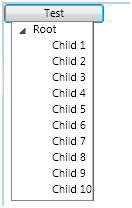
The simplest XAML to reproduce the problem is as follows:

<Popup x:Class=”AWOLTree.WinFormsTreePopup”
  xmlns=http://schemas.microsoft.com/winfx/2006/xaml/presentation
  xmlns:x=http://schemas.microsoft.com/winfx/2006/xaml
  xmlns:wf=”clr-namespace:System.Windows.Forms;assembly=System.Windows.Forms”
  PopupAnimation=”Scroll” Placement=”MousePoint” StaysOpen=”False” AllowsTransparency=”False”>
  <StackPanel>
    <WindowsFormsHost>
      <wf:TreeView x:Name=”winFormsPopupTreeView”/>
    </WindowsFormsHost>
  </StackPanel>
</Popup>

What ends up happening is that the tree gets rendered, but any attempt to interact with the tree results in the popup closing. </setup>

So it was time to dig into the mystery. Why was the popup closing (or the most sensible hypothesis…why did the popup think it needed to close?) My first choice here would have been to use the new VS 2008 .Net source code debugging. However, I have installed .Net 3.5 SP1, and unfortunately the related symbols have not yet been posted (damn my early adoption…)

Instead, it was time to go back to Plan B – Reflector, which is now being published by Red Gate after many years of stellar stewardship by Lutz Roeder.

The MSDN documentation for the Popup control states:

When you set this property [StaysOpen] to false, the Popup content window has mouse capture. The Popup loses mouse capture and the window closes when a mouse event occurs outside the Popup window.

So, odds are that the issue has something to do with Mouse Capture. Sure enough, in the sequence of events, OnLostMouseCapture is one of the last (obvious) overrides called before OnClosed. So I popped open the default implementation of OnLostMouseCapture and found the following:

 private static void OnLostMouseCapture(object sender, MouseEventArgs e)
{
  Popup popup = sender as Popup
  if (!popup.StaysOpen
  {
    PopupRoot reference = popup._popupRoot.Value
    if (Mouse.Captured != reference)
    {
      if (e.OriginalSource == reference)
      {
        if ((Mouse.Captured == null) || !MenuBase.IsDescendant(reference, Mouse.Captured as DependencyObject))
        {
          popup.IsOpen = false;
        }
(remainder omitted for clarity)

I put in a handler to check teh value of Mouse.Captured, and found that when a WinForms control inside of the popup was selected, it returned null, which falls directly into a call to popup.IsOpen = false, effectively closing the popup. Clicking on a WPF control inside of the same popup results in a valid reference being returned, explaining the difference in behavior.

Now what?

I see a few options. First, the code in question (which I was familiar with) could have been refactored to act on either a WPF or WinForms tree control, maintaining most of the desired reuse. Alternatively, there may be a way to work within the WPF framework to handle this special case, but I prefer to wait until I have .Net source debugging available again before looking at this option.