Enhanced Touch Manipulations for Silverlight and Windows Phone

Following up on Jeff’s series on Touch Interfaces for Windows Phone, I wanted to show an additional technique that allows support for Manipulations in Silverlight. Furthermore, when this is extended to the Phone, it allows support for moving two or more UI elements independently, which as Jeff noted, is not possible with the Manipulation events exposed in Silverlight for Windows Phone.
The article by Charles Petzold that Jeff refers to discusses the fact that while Manipulation events are present in Silverlight 4, they are not available for use. Attempts to hook these events either in code or in markup will result in a runtime exception. The good news is that there is a downloadable assembly that, with some additional work on the developers’ part, can provide the benefits of Manipulations to Silverlight 4 applications. This assembly is available as part of the Microsoft Surface Manipulations and Inertia Sample for Microsoft Silverlight, which is available for download here. The download includes the System.Windows.Input.Manipulations.dll assembly (hereafter the “Manipulations Assembly”) and a sample application, including code, which offers guidance as to how it can be used.
The Manipulations Assembly is a Silverlight version of the equivalent assembly included in .Net 4.0, and exposes a set of manipulation and inertia-related classes. Besides the inclusion of the letters “2D” in the name of each of the namespace members, these items work together to provide functionality that is similar to what Jeff described. Documentation for these elements is available at http://msdn.microsoft.com/en-us/library/system.windows.input.manipulations(VS.100).aspx.
As I mentioned above, using the Manipulation2D classes will require some additional work. Specifically, your code will need to provide input to the manipulation engine, provided by the ManipulationProcessor2D class, converting events of your choosing into individual manipulation actions and indicating when a particular manipulation has been completed. The manipulation engine will take that input and convert it into the appropriate Started, Delta, and Completed events, including calculating offsets, velocities, etc.
With respect to Christopher Walken, “Enough talkie-talkie, more ping-pong” (Let’s see some code!)
First we’ll start with a Silverlight 4.0 project and add a reference to the Manipulations Assembly (locate the folder the content was downloaded and extracted into from the link above.) As has been discussed, Silverlight UIElements expose several Manipulation events, none of which can be used. However, it would be handy if the Manipulations Assembly could be used to simulate the presence of those events on these types of objects. So we turn to Behaviors, with the intent of providing a behavior that allows us to raise these events out of instances of UIElements in our markup. This means we also need a reference to System.Windows.Interactivity.dll.
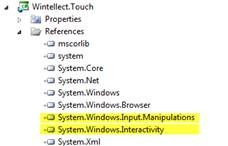
clip_image002
Moving from Touches to Manipulations
Once we have our references figured out, we can get to work. As I mentioned above, one of the caveats of working with the Manipulations Assembly is that some extra work is required. Specifically, you need to catch the application-wide Touch events and then feed them to the classes in the Manipulations Assembly. That’s a multi-step process, because Touch events are application-wide and we want manipulations to appear as if they were sourced from individual UIElements. So step 1 is to hook the touch events when the behavior is attached to its UIElement.
First when the behavior is attached:
Code Snippet
  1. protected override void OnAttached()
  2. {
  3. base.OnAttached();
  4. HookTouchEvents();
  5. HookMouseEvents();
  6. _subscribedBehaviors.Add(this);
  7. }
And the actual event subscription:
Code Snippet
  1. private static void HookTouchEvents()
  2. {
  3. if (!_touchEventsHooked)
  4. {
  5. _touchEventsHooked = true;
  6. System.Windows.Input.Touch.FrameReported += OnFrameReported;
  7. }
  8. }
There are two important things to note here. First, when attaching the behavior, the current instance is being added to a static list of attached behaviors (and removed from the list in the OnDetaching override)…more on this in a minute. Also, notice that the Touch events are only being hooked per type, instead of per class. This prevents the touch event from firing once per behavior instance.
The majority of the hard work happens in the OnFrameReported handler and the associated ProcessTouchPoints method, which does three key processing steps.
First, it identifies any new touch-point/behavior associations:
Code Snippet
  1. // Find any new touch-point/behavior associations.
  2. foreach (var touchPoint in touchPoints.Where(x => x.Action == TouchAction.Down))
  3. {
  4. // There shouldn’t be any of these!
  5. if (!_capturedBehaviors.ContainsKey(touchPoint.DeviceId))
  6. {
  7. // “Unowned” touch device – see if a behavior can be found for it to associate with at its current position…
  8. var matchingBehavior = GetBehaviorAssociatedWithTouchPoint(touchPoint.Position, _subscribedBehaviors);
  9. if (matchingBehavior != null)
  10. {
  11. _capturedBehaviors.Add(touchPoint.DeviceId, matchingBehavior);
  12. }
  13. }
  14. }
This is done by examining all of the incoming touch points for those whose action type is “Down.” For each of those touch points, we check to find any UIElements with an associated behavior that are directly under the touchpoint. For this, we use the VisualTreeHelper.FindElementsInHostCoordinates call and iterate over those elements to see if they match the AssociatedObject of any of the behaviors that are in the list that we maintain when attaching/detaching the behaviors.
Code Snippet
  1. private static Manipulate2DBehavior GetBehaviorAssociatedWithTouchPoint(Point touchPointPosition, IEnumerable<Manipulate2DBehavior> behaviorsToCheck)
  2. {
  3. Manipulate2DBehavior result = null;
  4. IEnumerable<UIElement> elements = VisualTreeHelper.FindElementsInHostCoordinates(touchPointPosition, Application.Current.RootVisual);
  5. foreach (var element in elements)
  6. {
  7. result = behaviorsToCheck.FirstOrDefault(x => x.AssociatedObject == element);
  8. if (result != null) break;
  9. }
  10. return result;
  11. }
If a matching behavior is found, it is considered to be “captured” and is added to a static dictionary that gathers the touchpoint’s DeviceId and the behavior. This step is what actually enables us to track multiple concurrent manipulations, as we are not able to react to multiple “captured” manipulations, as will be explained shortly.
The next step in the Touch Point processing is to actually process the touch events for all of the captured behaviors. This includes those who were just gathered in the previous step, as well as any previous touches for which a touch-down has been received without a touch-up to end it.
Code Snippet
  1. // Process any current touch-point/behaviors
  2. foreach (var capturedBehavior in _capturedBehaviors.Values.Distinct())
  3. {
  4. var associatedTouchDeviceIds = _capturedBehaviors.Where(x => x.Value == capturedBehavior).Select(x => x.Key);
  5. var associatedTouchPoints = touchPoints.Where(x => associatedTouchDeviceIds.Contains(x.DeviceId));
  6. capturedBehavior.HandleTouchEvents(associatedTouchPoints);
  7. }
To do this, the current list of touch points associated with any one behavior (in case multiple fingers are touching the same UIElement) are passed to the capturedBehavior’s HandleTouchEvents method.
Code Snippet
  1. private void HandleTouchEvents(IEnumerable<TouchEventData> points)
  2. {
  3. IEnumerable<Manipulator2D> manips = points.Select(p => new Manipulator2D
  4. {
  5. Id = p.DeviceId,
  6. X = p.PositionX,
  7. Y = p.PositionY
  8. });
  9. _manipulationProcessor.ProcessManipulators(DateTime.Now.Ticks, manips);
  10. }
The HandleTouchEvents method introduces an instance of the Manipulation2DProcessor, which is the “engine” that drives the manipulation calculations. Every instance of the behavior class has its own instance of the Manipulation2DProcessor called _manipulationProcessor that is responsible for handling the manipulation inputs (via the Manupulator2D class and ProcessManipulators method), as well as raising the appropriate manipulation events. Once the correct behavior (and hence Manipulation2DProcessor instance) is determined from the location of the input touchpoints, those touchpoints can be provided to the manipulation engine for it to handle the rest.
The final task of the ProcessTouchPoints method is to remove any “captured” behaviors based on the corresponding touchpoint TouchUp actions.
Code Snippet
  1. // Find and remove touch point/behavior associations as needed
  2. foreach (var touchPoint in touchPoints.Where(x => x.Action == TouchAction.Up))
  3. {
  4. if (_capturedBehaviors.ContainsKey(touchPoint.DeviceId))
  5. {
  6. var matchingBehavior = _capturedBehaviors[touchPoint.DeviceId];
  7. _capturedBehaviors.Remove(touchPoint.DeviceId);
  8. if (!_capturedBehaviors.ContainsValue(matchingBehavior))
  9. {
  10. //That was the last device holding on to the specific behavior…
  11. matchingBehavior.CompleteManipulation();
  12. }
  13. }
  14. }
For each touchpoint whose action is “Up”, the corresponding touchpoint/behavior entry is removed from the “captured” dictionary. If the removal causes no more references to a particular behavior to be in the dictionary, CompleteManipulation is called, which simply calls CompleteManipulation on the behavior’s manipulation engine, signaling it that the manipulation it was tracking is now complete.
Observant readers may have noticed that the method for associating behaviors and touches within the OnFrameReported handler means that the previous discussion treats multiple finger presses on a UIElement as a single unit – there is no support for Pinch and Rotate, which is being left as an exercise for another day…
Raising the Events
Once all of this plumbing is done, raising the events is simple enough – it is just a matter of subscribing to the manipulation engine’s events and echoing them to the behavior’s consumers. The manipulation engine events are hooked in the behavior instance’s constructor (the event declaration with the delegate {} assignment avoids all that nasty boilerplate check-for-null-when-firing-an-event code…)
Code Snippet
  1. public event EventHandler<Manipulation2DStartedEventArgs> ManipulationStarted = delegate { };
  2. public event EventHandler<Manipulation2DDeltaEventArgs> ManipulationDelta = delegate { };
  3. public event EventHandler<Manipulation2DCompletedEventArgs> ManipulationCompleted = delegate { };
Code Snippet
  1. /// <summary>
  2. /// Initializes a new instance of the <see cref=”Manipulate2DBehavior “/> class.
  3. /// </summary>
  4. public Manipulate2DBehavior()
  5. {
  6. _manipulationProcessor = new ManipulationProcessor2D(Manipulations2D.Translate);
  7. _manipulationProcessor.Started += (o, e) => ManipulationStarted(AssociatedObject, e);
  8. _manipulationProcessor.Delta += (o, e) => ManipulationDelta(AssociatedObject, e);
  9. _manipulationProcessor.Completed += OnManipulationCompleted;
  10. }
Hooking it All Up
To wire up the behavior, simply attach it to your desired UIElement and provide handlers for the events, as in the following code, adapted from Jeff’s articles…sorry, no animated penguins
Markup:
Code Snippet
  1. <navigation:Page x:Class=”Wintellect.Touch.MultiManipulatePage”
  2. xmlns=”http://schemas.microsoft.com/winfx/2006/xaml/presentation&#8221;
  3. xmlns:x=”http://schemas.microsoft.com/winfx/2006/xaml&#8221;
  4. xmlns:d=”http://schemas.microsoft.com/expression/blend/2008&#8243;
  5. xmlns:mc=”http://schemas.openxmlformats.org/markup-compatibility/2006&#8243;
  6. xmlns:navigation=”clr-namespace:System.Windows.Controls;assembly=System.Windows.Controls.Navigation”
  7. xmlns:i=”clr-namespace:System.Windows.Interactivity;assembly=System.Windows.Interactivity”
  8. xmlns:Touch=”clr-namespace:Wintellect.Touch;assembly=Wintellect.Touch”
  9. mc:Ignorable=”d” d:DesignWidth=”800″ d:DesignHeight=”600″
  10. Title=”MultiManipulatePage Page”>
  11. <Grid x:Name=”LayoutRoot” Background=”White”>
  12. <Rectangle x:Name=”RedRect” Width=”200″ Height=”200″ Fill=”Red”>
  13. <Rectangle.RenderTransform>
  14. <TranslateTransform Y=”-200″/>
  15. </Rectangle.RenderTransform>
  16. <i:Interaction.Behaviors>
  17. <Touch:Manipulate2DBehavior
  18. IsInertial=”True”
  19. ManipulationStarted=”TouchShapeBehavior_ManipulationStarted”
  20. ManipulationDelta=”TouchShapeBehavior_ManipulationDelta”
  21. ManipulationCompleted=”TouchShapeBehavior_ManipulationCompleted”/>
  22. </i:Interaction.Behaviors>
  23. </Rectangle>
  24. <Ellipse x:Name=”BlueCircle” Width=”200″ Height=”200″ Fill=”Blue”>
  25. <Ellipse.RenderTransform>
  26. <TranslateTransform Y=”200″ />
  27. </Ellipse.RenderTransform>
  28. <i:Interaction.Behaviors>
  29. <Touch:Manipulate2DBehavior
  30. IsInertial=”True”
  31. ManipulationStarted=”TouchShapeBehavior_ManipulationStarted”
  32. ManipulationDelta=”TouchShapeBehavior_ManipulationDelta”
  33. ManipulationCompleted=”TouchShapeBehavior_ManipulationCompleted”/>
  34. </i:Interaction.Behaviors>
  35. </Ellipse>
  36. </Grid>
  37. </navigation:Page>
Codebehind:
Code Snippet
  1. public partial class MultiManipulatePage : Page
  2. {
  3. public MultiManipulatePage()
  4. {
  5. InitializeComponent();
  6. }
  7. // Executes when the user navigates to this page.
  8. protected override void OnNavigatedTo(NavigationEventArgs e)
  9. {
  10. }
  11. private void TouchShapeBehavior_ManipulationStarted(Object sender, Manipulation2DStartedEventArgs e)
  12. {
  13. var senderShape = (Shape)sender;
  14. senderShape.Tag = senderShape.Fill;
  15. senderShape.Fill = new SolidColorBrush(Colors.Yellow);
  16. }
  17. private void TouchShapeBehavior_ManipulationDelta(Object sender, Manipulation2DDeltaEventArgs e)
  18. {
  19. var senderShape = (Shape)sender;
  20. var translateTransform = (TranslateTransform)senderShape.RenderTransform;
  21. translateTransform.X += e.Delta.TranslationX;
  22. translateTransform.Y += e.Delta.TranslationY;
  23. }
  24. private void TouchShapeBehavior_ManipulationCompleted(Object sender, Manipulation2DCompletedEventArgs e)
  25. {
  26. var senderShape = (Shape)sender;
  27. //TODO: This should really be done at the end of inertia, otherwise it will take the original color and keep moving…
  28. senderShape.Fill = senderShape.Tag as Brush;
  29. }
  30. }
That’s Interesting – Now What about the Phone?
What we have seen so far is the use of Behaviors and the Manipulations Assembly to provide manipulation event support in Silverlight 4 similar to that available in Windows Phone – in fact, better than that available in Windows Phone, since it can handle the simultaneous manipulation of multiple objects. But I said at the beginning that this could be extended to the phone – soooo…
It turns out this is quite simple to add to the phone. Because Windows Phone can consume regular Silverlight assemblies (as long as they do not stray outside of the phone’s own unique ‘sandbox’), the process is quite straightforward. Starting with a regular Silverlight for Windows Phone project, once again add references to System.Windows.Interactivity and to the Manipulations Assembly System.Windows.Input.Manipulations.dll. Then create the exact same Manipulate2DBehavior class in the phone project (there are techniques for sharing this code, including compiling it into its own assembly or using Add Existing as Link, for which information can be found elsewhere.) Using the same markup and codebehind content will provide similar results on the phone.
Markup:
Code Snippet
  1. <phone:PhoneApplicationPage
  2. x:Class=”MultiManipulate.Views.MultiManipulatePage”
  3. xmlns=”http://schemas.microsoft.com/winfx/2006/xaml/presentation&#8221;
  4. xmlns:x=”http://schemas.microsoft.com/winfx/2006/xaml&#8221;
  5. xmlns:phone=”clr-namespace:Microsoft.Phone.Controls;assembly=Microsoft.Phone”
  6. xmlns:shell=”clr-namespace:Microsoft.Phone.Shell;assembly=Microsoft.Phone”
  7. xmlns:d=”http://schemas.microsoft.com/expression/blend/2008&#8243;
  8. xmlns:mc=”http://schemas.openxmlformats.org/markup-compatibility/2006&#8243; xmlns:i=”clr-namespace:System.Windows.Interactivity;assembly=System.Windows.Interactivity” xmlns:Touch=”clr-namespace:Wintellect.Touch” FontFamily=”{StaticResource PhoneFontFamilyNormal}
  9. FontSize=”{StaticResource PhoneFontSizeNormal}
  10. Foreground=”{StaticResource PhoneForegroundBrush}
  11. SupportedOrientations=”Portrait” Orientation=”Portrait”
  12. mc:Ignorable=”d” d:DesignHeight=”768″ d:DesignWidth=”480″
  13. shell:SystemTray.IsVisible=”True”>
  14. <!–LayoutRoot is the root grid where all page content is placed–>
  15. <Grid x:Name=”LayoutRoot” Background=”Transparent”>
  16. <Grid.RowDefinitions>
  17. <RowDefinition Height=”Auto”/>
  18. <RowDefinition Height=”*”/>
  19. </Grid.RowDefinitions>
  20. <!–TitlePanel contains the name of the application and page title–>
  21. <StackPanel x:Name=”TitlePanel” Grid.Row=”0″ Margin=”12,17,0,28″>
  22. <TextBlock x:Name=”ApplicationTitle” Text=”MY APPLICATION” Style=”{StaticResource PhoneTextNormalStyle}“/>
  23. <TextBlock x:Name=”PageTitle” Text=”page name” Margin=”9,-7,0,0″ Style=”{StaticResource PhoneTextTitle1Style}“/>
  24. </StackPanel>
  25. <!–ContentPanel – place additional content here–>
  26. <Grid x:Name=”ContentPanel” Grid.Row=”1″ Margin=”12,0,12,0″>
  27. <Rectangle x:Name=”RedRect” Width=”100″ Height=”100″ Fill=”Red”>
  28. <Rectangle.RenderTransform>
  29. <TranslateTransform/>
  30. </Rectangle.RenderTransform>
  31. <i:Interaction.Behaviors>
  32. <Touch:Manipulate2DBehavior
  33. IsInertial=”True”
  34. ManipulationStarted=”TouchShapeBehavior_ManipulationStarted”
  35. ManipulationDelta=”TouchShapeBehavior_ManipulationDelta”
  36. ManipulationCompleted=”TouchShapeBehavior_ManipulationCompleted”/>
  37. </i:Interaction.Behaviors>
  38. </Rectangle>
  39. <Ellipse x:Name=”BlueRect” Width=”100″ Height=”100″ Fill=”Blue”>
  40. <Ellipse.RenderTransform>
  41. <TranslateTransform />
  42. </Ellipse.RenderTransform>
  43. <i:Interaction.Behaviors>
  44. <Touch:Manipulate2DBehavior
  45. IsInertial=”True”
  46. ManipulationStarted=”TouchShapeBehavior_ManipulationStarted”
  47. ManipulationDelta=”TouchShapeBehavior_ManipulationDelta”
  48. ManipulationCompleted=”TouchShapeBehavior_ManipulationCompleted”/>
  49. </i:Interaction.Behaviors>
  50. </Ellipse>
  51. </Grid>
  52. </Grid>
  53. </phone:PhoneApplicationPage>
Codebehind:
Code Snippet
  1. public partial class MultiManipulatePage : PhoneApplicationPage
  2. {
  3. public MultiManipulatePage()
  4. {
  5. InitializeComponent();
  6. }
  7. private void TouchShapeBehavior_ManipulationStarted(Object sender, Manipulation2DStartedEventArgs e)
  8. {
  9. var senderShape = (Shape)sender;
  10. senderShape.Tag = senderShape.Fill;
  11. senderShape.Fill = new SolidColorBrush(Colors.Yellow);
  12. }
  13. private void TouchShapeBehavior_ManipulationDelta(Object sender, Manipulation2DDeltaEventArgs e)
  14. {
  15. var senderShape = (Shape)sender;
  16. var translateTransform = (TranslateTransform)senderShape.RenderTransform;
  17. translateTransform.X += e.Delta.TranslationX;
  18. translateTransform.Y += e.Delta.TranslationY;
  19. }
  20. private void TouchShapeBehavior_ManipulationCompleted(Object sender, Manipulation2DCompletedEventArgs e)
  21. {
  22. var senderShape = (Shape)sender;
  23. //TODO: This should really be done at the end of inertia, otherwise it will take the original color and keep moving…
  24. senderShape.Fill = senderShape.Tag as Brush;
  25. }
  26. }
The Wintellect Silverlight Touch Library – aka LightTouch
Ultimately, the code referenced above has made its way into a larger library that provides additional Touch functionality beyond just attachable support for Manipulations, including support for Gestures, as well as enhancements that make it very easy to add touch support to scrollable controls like the ListBox.  For Manipulations, Inertia is also added to the mix.  This core manipulation Behavior is actually at the heart of each of these additional elements.  This project is being published up on CodePlex and can be accessed at http://lighttouch.codeplex.com.
Summary
Obviously, it is a little hard to see all this in action. To that end, if you have a multi-touch-enabled monitor, you can download  the project from CodePlex and try it out. While there was some tedious boilerplate code required to hook touch events up to the individual UIElements’ manipulation behaviors, what results in the end is a reusable behavior that can be easily reused throughout an application.
Author’s Note: Parts of the content prepared for this article were inspired by content from Jeff Prosise’s blog series on “Touch Interfaces for Windows Phone”, as well as Mike Taulty’sTouched” blog series.

Silverlight for Windows Phone Programming Tip – Navigation

When using the Silverlight for Windows Phone APIs to navigate from one page to another, it is necessary to use the Navigate method on the PhoneApplicationPage instance’s NavigationService property.  When making this call, it is important to note the required Uri Syntax, as follows:

Navigating to a page in the same assembly:

NavigationService.Navigate(new Uri("/Folder(s)/TargetPage.xaml", UriKind.relative));

Navigating to a page in another assembly:

NavigationService.Navigate(new Uri("/AssemblyName;component/Folder(s)/TargetPage.xaml", UriKind.Relative));

The current MSDN Documentation (update date of 1/28/2001) for the Navigate method does not include any text that specifies the requirements for the syntax or the Uri, so here goes my attempt to provide the missing content:

  • The provided Uri must start with a forward slash (/), indicating the content is local to the Xap file.  Failure to include the leading slash will result in an ArgumentException (details below) being thrown.
  • The UriKind must be specified as UriKind.Relative (or URIKindRelativeOrAbsolute, but why ask for trouble?)  Omitting the UriKind uses the default value of URIKind.Absolute, which yields the same ArgumentException
  • To navigate to a page in another assembly contained within the same Xap file, the syntax must include the Assembly Name for the assembly that contains the page, then a semicolon and the word “component”, followed by the folder path to the page.
    • The leading slash and the specification of a Relative Uri are still required, with the same consequences if omitted.
    • Omitting the word “component” results in an InvalidOperationException (No Xaml was found at the location…)

The description contained in the Argument exception is actually quite helpful – it reads “Navigation is only supported to relative URIs that are fragments, or begin with ‘/’, or which contain ‘;component.”  However, you have to first fail in your attempts to navigate and be in a position to trap and analyze the exception for it to be useful.

Making small and subtle mistakes in the navigation Uri is quite easy to do…not only is missing relevant documentation missing as noted above, but this API also falls quite short in the “Pit of Success” category at the expense of matching up with the Navigation API in regular Silverlight (I have witnessed good presenters’ phone demos get derailed and lose precious time because of some simple omissions in this regard.)  A better alternative would have been to have offered a way to avoid the specific nuances of the API in favor of phone-specific methods.  (Jeremy’s Ultra-Light Windows Phone 7 MVVM Framework accomplishes something very close/similar.)  Fortunately, if you are doing a lot of navigation in your app and would like to include a set of phone-specific NavigateToPhonePage calls which figure out and correct the necessary Uris for you, there is a quick way to do so – using Extension Methods.  A set of simple & helpful starter Phone Navigation extension methods follows:

public static class PhoneNavigationServiceExtensions
{     
      public static void NavigateToPhonePage(this NavigationService navigationService, String page)     
      {          
           if (navigationService == null) throw new ArgumentNullException("navigationService");          
           if (!page.StartsWith("/")) page = "/" + page;  //Compensate for lack of leading slash          
           navigationService.Navigate(new Uri(page, UriKind.Relative)); //Build the Uri, force it to be Relative.
      }

      public static void NavigateToLocalPhonePage(this NavigationService navigationService, String page)
      {
           NavigateToPhonePage(navigationService, page);
      }     

      public static void NavigateToExternalPhonePage(this NavigationService navigationService, String assemblyName, String page)     
      {          
           if (!page.StartsWith("/")) page = "/" + page;  //Compensate for lack of leading slash in the page          
           NavigateToPhonePage(navigationService, String.Format("{0};component{1}", assemblyName, page));     
      }
}

Given these extensions, the following navigation calls all work without a need to specify the UriKind, and with varying inclusions and omissions of the forward slashes:

// Using NavigateToLocalPhonePage requires nothing more than the path to the page's xaml file
NavigationService.NavigateToLocalPhonePage("/Folder(s)/TargetPage.xaml");
NavigationService.NavigateToLocalPhonePage("Folder(s)/TargetPage.xaml");

// Using NavigateToExternalPhonePage calls out the need for the assembly name and the page's xaml file path
NavigationService.NavigateToExternalPhonePage("/WindowsPhoneClassLibrary1", "/Folder(s)/TargetPage.xaml");
NavigationService.NavigateToExternalPhonePage("WindowsPhoneClassLibrary1", "Folder(s)/TargetPage.xaml");

// Using the NavigateToPage method directly works for either, but the External page must be specified correctly
NavigationService.NavigateToPhonePage("Folder(s)/TargetPage.xaml");
NavigationService.NavigateToPhonePage("WindowsPhoneClassLibrary1;component/Folder(s)/TargetPage.xaml");

A Matter of State, Part 3

The previous 2 posts discussed using the Page and Application State Dictionaries to restore state following the application being tombstoned, as well as some other potential uses for the Application State Dictionary.  This final post in the series will cover the user of Isolated Storage from Windows Phone applications.

Isolated Storage Basics
Isolated Storage provides a virtual file system that allows an application (and in some cases applications) access to an (ahem) isolated area of persistent storage, usually disk-based.  The precise location is hidden from applications and is not meant to be human-readable/accessible.  The technique of using Isolated Storage to preserve state is one that is available across all flavors of .Net – there is support for Isolated Storage in the .Net Framework, in the Silverlight Runtime (both on the PC and the Mac), and in Silverlight for Windows Phone.  While many of the mechanics of using Isolated Storage APIs are similar between the platforms, there are some distinctions in Windows Phone that make its support for Isolated Storage unique.
At its core, data stored in Isolated Storage is placed in a scoped area called a Store.  Each runtime described above has access to a different collection of scopes for the stores, with .Net having access to the most (User, Domain, Assembly, Roaming, Machine, Application), and Silverlight having access to just two – Site and Application.  The Site scope allows shared storage access to all Silverlight applications on the same web domain, and the Application scope is identified by each unique Silverlight XAP file.
In Silverlight for Windows Phone, the Silverlight applications are not hosted on any web site, so the only Isolated Storage scope available in phone applications is per Application.  One important implication of this is that there is currently no way of sharing or exchanging data between applications via the phone file system.  Having gone over the concept of tombstoning, there’s also an implication that the technique of using Local Connections is not available for inter-application communication (if only one application can be running at a time, there’s nobody to communicate with.)  Taking this all one step further, the only way to communicate between different applications in Windows Phone is by using some form of internet-based storage.
The following code shows the basic procedure for writing data to Isolated Storage:
private void WriteData()
{
using (IsolatedStorageFile store = IsolatedStorageFile.GetUserStoreForApplication())
{
// Get the directories in the current Store
String[] directoryNames = store.GetDirectoryNames(“search pattern”);


// Get the files in the given directory path
String[] fileNames = store.GetFileNames(“search pattern”);
//Maybe create one or more directories
store.CreateDirectory(“SomeNewDirectory”);
// Open a file stream (normal File.Open behavior)
using (IsolatedStorageFileStream fileStream = store.OpenFile(“file path”FileMode.Create))
{
using (StreamWriter writer = new StreamWriter(fileStream))
{
writer.WriteLine(“Some Data”);
}
}
}
}

  • Use the GetUserStoreForApplication call to get a reference to the application’s Isolated Storage file store
  • Using the store reference, it is possible to obtain a list of directories and/or files within the current store, as well as to create files and directories
  • Note that the process for creating files is the same as for regular files (specifying FileMode, etc.)
  • The result of an opened file is an IsolatedStorageFileStream object, which inherits from the FileStream class.
  • Once a reference to the IsolatedStorageFileStream object is available, code can be written against it as it can for pretty much any FileStream.  The example above wraps the stream with a StreamWriter which exposes a WriteLine that can be used to write a line of text into the stream (and hence the underlying file.)
  • Note that using blocks are being used to perform the necessary cleanup on Disposable objects throughout the process.
The following code shows the basic procedure for reading code from Isolated Storage:
private void ReadData()
{
using (IsolatedStorageFile store = IsolatedStorageFile.GetUserStoreForApplication())
{
if (store.FileExists(“file path”))
{
using (IsolatedStorageFileStream fileStream = store.OpenFile(“file path”FileMode.Open))
{
using (StreamReader reader = new StreamReader(fileStream))
{
String lineOfText = String.Empty;
while (null != (lineOfText = reader.ReadLine()))
{
DoSomethingInterestingWithText(lineOfText);
}
}
}
}
}
}
  • Get a reference to the application’s Isolated Storage file store
  • Using the store reference, check to see fi the desired file exists
  • If the file exists, open the file for reading, which returns an IsolatedStorageFileStream object, which inherits from the FileStream class.
  • Once a reference to the IsolatedStorageFileStream object is available, code can be written against it as it can for pretty much any FileStream.  The example above wraps the stream with a StreamWriter which exposes a ReadLine that can be used to read a line of text at a time from the stream (and hence the underlying file.)
Within the System.IO.IsolatedStorage namespace, there is a “helper class” that reduces some of the work required for routine Isolated Storage tasks.  Much like the Application and Page State Dictionaries, the IsolatedStorageSettings class exposes a Dictionary of objects that uses string values for keys.  The IsolatedStorageSettings class is accessible as a singleton through the IsolatedStorageSettings.ApplicationSettings property (note that “regular Silverlight” also exposes IsolatedStorageSettings.SiteSettings for site-scoped storage.)
The following code shows writing and reading from the ApplicationSettings dictionary:
private void WriteSettingsData()
{
IsolatedStorageSettings.ApplicationSettings[“key”] = value;
}
private void ReadSettingsData()
{
if (IsolatedStorageSettings.ApplicationSettings.Contains(“key”))
{
value = IsolatedStorageSettings.ApplicationSettings[“key”];
}
}
Many possibilities are available for storing and retrieving data through Isolated Storage beyond simply reading and writing text using the StreamWriter and/or IsolatedStorageSettings.  These range from using Xml to hold serialized objects through custom database implementations, including my Wintellect colleague Jeremy Likness’s
Sterling Object-Oriented database and the Codeplex implementation/port of Sqlite.  Like most file systems, there are concerns regarding the quantity and size of items in any given folder, and there is a great discussion here on the performance behavior of Isolated Storage in Windows Phone under load.

Capacity
Another important distinction between Isolated Storage for Silverlight and Isolated Storage for Silverlight for Windows Phone is that whereas there are user quotas in “regular” Silverlight (1 MB max for browser-based apps before the user must be asked if they would like to increase the quota, and 25 MB for out-of-browser apps), there are no storage quotas in place for Silverlight for Windows Phone applications.  Storage space is limited by the amount of storage space available on the device itself.
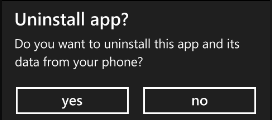
Not only is there no quota for the amount of storage that any one application can consume, there is also no File Explorer or WinDirStat equivalent for the phone to determine how much space is being consumed by any one application.  Although there’s no way to know which application may be consuming all of the available space on a device, if an application is chosen for deletion, when an application is uninstalled from the phone (locate the shortcut in the application list, hold down the application icon, and in the context menu that appears, choose uninstall) its isolated storage contents are deleted and the space they occupied is recovered.
Figure 1- Prompt When Uninstalling an Application
To determine the total amount of space remaining on disk, the IsolatedStorageFile instance offers an AvailableFreeSpace property.  With “traditional Silverlight”, this returns the amount of space remaining in the current quota.  Since Silverlight for Windows Phone does not have quotas, the AvailableFreeSpace property will return the amount of storage space remaining on the device.
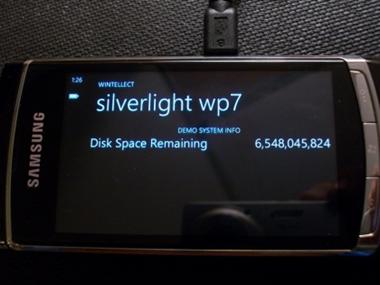
In the following screenshots, an application was created that wrote a large amount of data to Isolated Storage.  A second application was written to show the amount of drive space remaining.  In the first screenshot, the storage application has not yet written its data to disk.  In the second screenshot, it has written data to disk, as can be seen by the reduced amount of available free space remaining.  Finally, in the third screenshot, the storage application has been uninstalled and its storage space has been reclaimed.  (Note that the extra space appearing in the third screenshot is most likely due to the additional space received by the removal of the Silverlight XAP file in addition to the content in Isolated Storage.)
Figure 2- Before Saving Large File
Figure 3- After Saving Large File
Figure 4- After “Big File” Application is Uninstalled
Knowing this about uninstallation, the next logical question usually deals with updating.  When an application is updated (a new version is placed in the Marketplace), the data in Isolated Storage is retained.  It is up to the application developer(s) to handle issues related to the handling of versioning with any previous application versions’ contents in Isolated Storage.

Tombstoning
While Isolated Storage is the only one of the three state-preservation mechanisms discussed that can work across multiple launches of the same application (and hence beyond Tombstoning), it is certainly usable for Tombstoning scenarios, and is absolutely necessary in some cases, such as when the amount of data to be stored exceeds the limitations imposed by the other techniques.  Because of the performance implications of Isolated Storage (discussed in the previous article in the series, ~30% to ~55% slower) and the possibility of larger amounts of data, there are important time limits that need to be discussed.
First of all, as stated here in the MSDN documentation, if an application takes more than 10 seconds to launch, the application may be terminated by the operating system.  Furthermore, the Windows Phone Application Certification Requirements state that in order to pass the certification process, an application must render its first screen “within 5 seconds after launch” (5.2.1a), and must be responsive to user input “within 20 seconds after launch” (5.2.1b)  Finally, an application must conclude the Activated and Deactivated events within 10 seconds. (5.2.3)  As a result, it may be beneficial to consider breaking the content in Isolated Storage into smaller files that are accessed as needed (instead of big-load-up-front), background threads be used for loading large content at startup, and similar consideration be employed when saving data.
With these time considerations in mind, the key application lifetime events include:
  • Launching – Raised when a new instance of the application is launched (and will not be raised if the application is being activated following tombstoning.)
  • Closing – Raised when the application is terminated.  In Silverlight applications, this only occurs when the user uses the Back button past the first page in the application’s BackStack (and will not be raised when the application is being tombstoned.)
  • Deactivated – Raised when the user navigates away from the application (and in most cases, is tombstoned.)
  • Activated – Raised when the user returns to an application after it was deactivated.
Because both Deactivated and Closing (under most circumstances) result in the application being terminated and in-memory state being destroyed, it is important to ensure that state is appropriately saved and restored in both circumstances.  State information retrieved when an application is initially launched is not automatically preserved or restored.  For that reason, it is not atypical to see the Launching/Activated and Closing/Deactivated event handlers call into a common pair of methods (such as RestoreState and SaveState, respectively) to deal with common content.

In Closing
In this series, the posts focused on mechanisms for preserving state in Windows Phone Silverlight applications.  The key concepts presented included:
I hope that this coverage has helped to illustrate the benefits and limitations of each.

New England Code Camp 14 Presentation Materials

I have uploaded the content from my two talks at the New England Code Camp – Introduction to Windows Phone 7 Development with Silverlight and Advanced Windows Phone 7 Development with Silverlight. The content can be found here and here (Slideshare links here and here.) The uploaded content includes:

  • Presentation slides, which include the reference and event links I mentioned during the talk
  • An interactive pdf of the outline I worked off for the talk (Acrobat Reader may be required)
  • The sample code

The demo code was prepared with the RTM version of the Windows Phone Developer Tools, as well as some controls from the Silverlight for Windows Phone Toolkit. To use the Bing Maps demos without the watermark indicating the control needs to be licensed, please go to the Bing Maps Developer portal, register, and put your application key into the properties in the BingMapsKey.cs files.

* Note – when using the Notification Service and Bing Maps Demos from the Advanced topic, be sure to set the solution to use Multiple Startup Projects (PhoneDemo and PhoneDemoService.)

Windows Phone 7 Developer Tools RTM, etc.

With all due respect to Steve Martin, “The new phone tools are here! The new phone tools are here!”

Following up on my recent presentations introducing development for Windows Phone 7 with Silverlight, the release of the RTM version of the Windows Phone 7 to the public today was announced today, along with a couple other key items. First and foremost, the new tools can be found here. The “normal” download is a web-based installer, but there is a tiny link at the bottom of the page for downloading an ISO image. The RTM includes the long awaited (by some) Panorama, Pivot, and Map controls, with Panorama and Pivot being backed by specific starter-project templates in both Visual Studio and Blend. The Panorama control enables the presentation of content on a long horizontal canvas through which the phone display serves as a viewport (think of the Panorama Control as the ruler portion of a slide-rule, and the phone as the central strip.) The Pivot control can be thought as the equivalent of the Tab-Control for the phone. Finally, the Map control presents the Bing Maps Silverlight control to the phone. More information on using Bing Map controls (outside of the phone, but there is some translation…) can be found here.

There are some subtle breaking changes in the new toolkit, and they are outlined in the Release Notes, which are also available for download from the download page.

Silverlight for Windows Phone Toolkit

Also announced today was the release of the Silverlight for Windows Phone Toolkit (yes, that name is certainly a mouthful.) The toolkit release includes several additional controls for the phone, including a ContextMenu, Date & Time Pickers, a ToggleSwitch (think on/off light-switch), and a Wrap Panel. The toolkit also includes the Gesture Listener, which allows some common touch-based gestures to be easily hookup to event handlers right in the phone page’s Xaml markup. The Silverlight for Windows Phone Toolkit can be downloaded here, and general Silverlight Toolkit information can be found here. As with the other Silverlight Toolkits, the Source Code is available for download, as is a Sample Application. While the phone’s version of the sample browser is maybe not as slick as the “regular” Silverlight Toolkit’s (including source code visible directly in the application), it is still a great help. The Sources and Sample code can be found here.

More Free Jump-Start Webinars

In July, a series of Jump-Start webinars were produced which have been posted to Channel 9 as 12 hours’ worth of videos. Also announced today is an additional webinar series which will offer a deeper look at Windows Phone 7 development, including using the new Panorama, Pivot, and Map controls, Application Performance, Blend, and a live Q&A. The live webinar will span 7 hours on Tuesday, September 21 2010, and registration is available here. The original content is posted at Channel 9 here, with this content hopefully soon to follow.

Vermont Code Camp 2010 Presentation Materials

Julie Lerman and her team have once again put on a terrific event at the 2010 Vermont Code Camp. The host team’s terrific hospitality as well as the great facilities provided by the University of Vermont made this an extremely enjoyable event to attend and present at.

I have uploaded the content from my talk – Introduction to Windows Phone 7 Development with Silverlight – and the content can be found here (Slideshare link here). The uploaded content includes:

  • Presentation slides, which include the reference links I mentioned during the talk
  • An interactive pdf of the outline I prepared for the talk (Acrobat Reader may be required)
  • The sample application, with notes added to locate the key concepts that were discussed

The demo code was prepared with the Beta version of the Windows Phone Developer Tools – there may be breaking changes as later versions come out.

Finding Binding Trouble

Homer: There are three ways to do things: the right way, the wrong way, and the Max Power way!
Bart: Isn’t that just the wrong way?
Homer: Yeah, but faster!
– The Simpsons, “Homer to the Max

I was recently doing some performance work in the neighborhood of WPF Items Controls bound to collections where the underlying collection was likely to be swapped out based on behaviors within the application. The exercise got me thinking about the topic and it seems like a good thing to raise some items that are easy to overlook, but most developers should consider…  

First and foremost, there have always been a variety of collection classes in the .Net framework, and they all have specific situations that make them more or less desirable. This extends beyond the difference between Stacks, Queues, Lists, Dictionaries, etc, and includes having to make decisions about how symmetric the ratio will be between reads/writes, the need to sort, the type of value being collected, etc. Choices about which collections to use and how to use them when providing data for databinding in a UI can have a profound effect on performance and usability of the user interface (while this line of thought was started by work in WPF and naturally extends to Silverlight, it can even apply to WinForms and beyond.)  

Within WPF and Silverlight, the INotifyCollectionChanged interface (defined in System.Collections.Specialized) is at the center of data binding with ItemsControls (actually, IBindingList – which is more commonly used with WinForms data binding – is too…) The focus of this interface is to raise a CollectionChanged event whenever something happens that modifies the contents of the collection. The arguments delivered by this event include the type of change (add, remove, replace, move, and reset) and where applicable, information about the collection’s old and/or new state. The most used class that implements this interface in WPF/Silverlight is the ObservableCollection<T>, defined in the System.Collections.ObjectModel namespace.  

I have often come across this code to expose these collections:  

private ObservableCollection<String> firstCollection;
public ObservableCollection<String> FirstCollection
{
     get { return firstCollection; }
     set
     {
          firstCollection = new ObservableCollection<String>(value);
          RaisePropertyChanged("FirstCollection");
    
}
}
I have 4 problems with this code. First, the public property is exposing too much information about the type of backing store that is being used for the underlying collection. Consumers of this property should not care if it uses ObservableCollection<T>, BindingList<T>, or some other custom implementation. Exposing ObservableCollection<T> places an obligation on methods that call the property to provide an ObservableCollection<T> (or a derivative thereof) and makes the codebase difficult to refactor down the road. Encapsulation is broken, etc.  

Second, the property may very well return a null value for the collection at any point. Consumers of the API that would like to iterate over the collection have to remember to add an extra null-check before every attempt to iterate. If they forget such a check, the application is potentially just a few mouse-clicks away from an unhandled exception. It is that much harder for consumers of the API to “fall unavoidably into the pit of success.” I prefer to ensure that and appropriate enumerable value is always returned for these properties, unless null has a very specific meaning (in which case, there may be a better and more expressive way to indicate such a state then with a null value.) Assume the next developer is going to screw things up…and then don’t let him.  

My third concern is probably debatable, but anyway, the collection reference here is not constant. Whenever the property setter is called, the underlying collection is changed to a completely new reference. This requires that a property change notification be raised in order to tell the binding control that it needs to redo the binding, as the object it had bound to is no longer relevant, and neither its content, nor any changes to it should be reflected in the UI (for that matter, it may very well be time to relinquish the resources and space this original item is using.)  

The final item is discussed at the bottom of this post and is slightly orthogonal to CollectionChanged notifications, but is still at play in the code above…it is basically the use of a developer-provided string to provide the property name that is being changed, in the case where a property change notification is necessary as discussed above. The compiler will not help to call out any kind of fat-finger mistake in the typing of the property name, nor will it help if the name of the property is changed but changing the string argument has been overlooked (this is the case even if constants are used…it is still just a string that gets passed to reflection inside of the binding control, and is subject to the same typo and sync issues that can occur elsewhere.)    

Dealing with the First and Second Issues

For starters, instead of returning ObservableCollection<T>, the property should simply return an appropriate abstraction – more often than not (and especially with the power of LINQ-to-objects), the IEnumerable<T> interface is appropriate. Most binding implementations check to see if the provided object implements a well-known interface such as INotifyCollectionChanged and use a cast to that interface anyway. Next, in order to address the possibility of returning null from this layer of the API the getter is changed to trap this condition and return an empty/degenerate value:  

private ObservableCollection<String> firstCollection;
public IEnumerable<String> FirstCollection
{
     get { return firstCollection ?? new ObservableCollection<String>(); }
     set
     {
          firstCollection = new ObservableCollection<String>(value);
          RaisePropertyChanged("FirstCollection");
     }
} 

Providing a Constant Reference to the Collection Object

In order to accomplish this, I used to use the following code:   

private readonly ObservableCollection<String> secondCollection = new ObservableCollection<String>();
public IEnumerable<String> SecondCollection
{
     get { return secondCollection; }
     set
     {
          secondCollection.Clear();
          if (value != null)
          {
               // An equivalent extension method to the code that follows can be used.
               // secondCollection.AddRange(value);
               foreach (var item in value)
               {
                    secondCollection.Add(item);
               }
          }
     }
}  

This approach was quick to implement, and fairly clear to follow. For small collections and simple situations, it worked fairly well. However, there is one big performance-related problem with this approach. The ObservableCollection<T> dutifully raises a CollectionChanged event every time an item is added inside the “AddRange” loop, which causes the binding control to respond, etc. In simple observations (binding a ListBox to a collection of 10,000 Strings), the performance hit is between 5x and 10x.   

To overcome this gaffe, it is necessary to be able to use an ObservableCollection<T> implementation that can say “when I am swapping out the collections’ contents, don’t raise an event every time an item is added, but instead raise a single event at the end of the operation that indicates the whole collection has been reset.” At least one third party control-company that I am aware of includes something like this in their toolkit, but implementing a simplified version yourself is a fairly straightforward process:   

  • Create a new class that derives from ObservableCollection<T>
  • Add a Boolean variable called suppressNotifications
  • Provide a ResetContents method as follows:
    • Note the suppressNotifications value is flagged when starting the operations, and then turned back off when done, followed by a Reset CollectionChanged notification.
public void ResetContents(IEnumerable<T> items)
{
     if (items == nullthrow new ArgumentNullException("items");
     try
     {
          suppressNotifications = true;
          ClearItems();
          foreach(var item in items)
          {
               Add(item);
          }
     }
     finally
     {
          suppressNotifications = false;
          OnCollectionChanged(new NotifyCollectionChangedEventArgs(NotifyCollectionChangedAction.Reset));
      }
}  
  • Provide overrides for the ClearItems and InsertItem virtual methods (defined in Collection<T>), which are used internally within the Clear and Add methods, respectively.
    • ObservableCollection<T> implements overrides for these that raise the events we want to avoid for now.
    • Note that if events are not being suppressed, the collection just defers to the base implementation from ObservableCollection<T>. Otherwise, it just checks for reentrancy and then proceeds to insert items without raising any events.
protected override void ClearItems()
{
     if (suppressNotifications)
     {
          CheckReentrancy();
          Items.Clear();
     }
     else
     {
          base.ClearItems();
     }
}

protected override void InsertItem(int index, T item)
{
     if (suppressInsertEvent)
     {
          CheckReentrancy();
          Items.Insert(index, item);
     }
     else
     {
          base.InsertItem(index, item);
     }
}

For this implementation, performance is again on par with that seen when the entire collection is swapped out with and a PropertyChange notification is raised. The final implementation is as follows (note that because an IEnumerabe<T> is being returned, the actual backing type is irrelevant to the consuming code:   

private readonly EnhancedObservableCollection<String> thirdCollection 
new EnhancedObservableCollection<String>();
public IEnumerable<String> ThirdCollection
{
     get { return thirdCollection; }
     set
     {
          thirdCollection.Clear();
          if (value != null)
          {
               thirdCollection.ResetContents(value);
          }
     }
}

While these three changes required a little extra (boilerplate) work, the net result is code that the consumers of this API will have a much harder time using incorrectly:   

  • They do not have to be concerned with the precise backing type, and the result is Linq-friendly if they want to find out about its contents (eg call Count(), etc.)
  • They can safely iterate over the collection without worrying about whether it has been set to null.
  • They can take and hold a reference to the collection and not worry about whether or not some other code has called the setter, leaving a stale reference.

One Final Note – Property Change Notifications

Back to the issue about “magic strings” and the INotifyPropertyChanged interface. Even in .Net 2, developers sometimes went to some lengths to provide some level of either compile-time checking or debug-mode assistance. Options I have seen include using reflection to determine the name of the property that is calling the “RaiseXXX” helper function, using reflection only when in debug mode to verify that the name provided maps to an actual property and raising an assertion to try to make the issue more obvious during testing, using constants or enumerations for the string values, etc. With .Net 3 and LINQ constructs (specifically Expression Trees), there is a new and elegant solution that involves the compiler in the process of ensuring that valid entries are provided, and though it does have a performance impact, it is important to remember that when binding, reflection is usually used from the item doing the binding anyway, which brings along its own set of performance considerations/limitations. Wintellect’s
Jeremy Likness has a great, detailed, and more complete writeup (required reading!) on this approach, but here is a simplified implementation:   

public event PropertyChangedEventHandler PropertyChanged;
private void RaisePropertyChanged<T>(Expression<Func<T>> propertyBeingChanged)
{
     if (propertyBeingChanged == nullthrow new ArgumentNullException("propertyBeingChanged");
     var memberExpression = propertyBeingChanged.Body as MemberExpression;
     if (memberExpression == nullthrow new ArgumentException("propertyBeingChanged");
     String propertyName = memberExpression.Member.Name;
     var tempPropertyChanged = PropertyChanged;
     if (tempPropertyChanged != null)
     {
          tempPropertyChanged(thisnew PropertyChangedEventArgs(propertyName));
     }
}

And the call to raise the property change notification, in the context of our original property implementation, above:   

private ObservableCollection<String> firstCollection;
public IEnumerable<String> FirstCollection
{
     get { return firstCollection ?? new ObservableCollection<String>(); }
     set
     {
          firstCollection = new ObservableCollection<String>(value);
          RaisePropertyChanged(() => FirstCollection);
     }
}
Notice the Lambda function used in the call to RaisePropertyChanged. Miss the property name by so much as a letter (assuming no other property matches the new name), and the compiler will protest. This does come at a performance price, however. In my tests, the "Compiler-Safe" option can take as much as 200x as the "magic string" version, which on my dev laptop was the difference between five one-hundredths of a second and one full second to raise 100,000 PropertyChanged event notifications. How big of a concern this is may largely depend on how many property changes you anticipate need to be completed within your bound data, which brings us back to the original discussion about choosing collections wisely in one's application implementations. If your properties are likely to change only through user interaction in the UI, there's probably a reduced need to worry about millisecond-range performance issues like these and to favor an implementation that reduces the amount of run-time debugging that will be required (but it is still important to know about and evaluate these issues.)   

Sample Code Used for Timings

jQuery IntelliSense Issue

I recently ran into an issue with IntelliSense support for jQuery 1.3.2 in Visual Studio 2008 SP1. Unfortunately, I did not find a whole lot of precise documentation for the solution, which was actually quite simple once I stumbled into it.

Basically, I kept getting the message “Error updating Jscript IntelliSense” … “jquery-1.3.2.js: Object doesn’t support this property or method @ 2139:1”

 My script tag entries were as follows:

<script type=”text/javascript” src=”jquery-1.3.2-vsdoc2.js”/>
<script type=”text/javascript” src=”jquery-1.3.2.js”/>

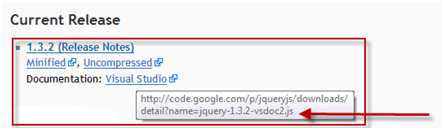
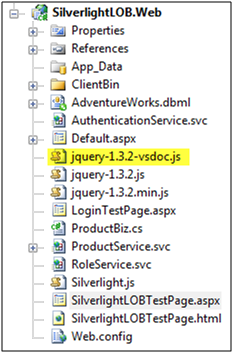
The root case is that the default download from the jQuery site for the IntelliSense documentation is a “vsdoc2” file, where IntelliSense expects a vsdoc file. Simply renaming the file and changing the script reference fixes the problem.

Note the vsdoc2.js filename


Project with Renamed File

My revised script tag entries:
<script type=”text/javascript” src=”jquery-1.3.2-vsdoc.js”/>

<script type=”text/javascript” src=”jquery-1.3.2.js”/>

And now jQuery IntelliSense works as advertised!

New Script Reference with IntelliSense Working

More from Silverlight at Boston Code Camp

I received a request from one of the attendees at my presentation to pass along some information about an upcoming online Silverlight course being offered as of next week and figured I would pass it along (friendly faces in an audience are priceless.) His request follows:  

 Mr. Garland,
    I have some information on an online Silverlight 2 course that will start in a week. I’m hoping you’ll consider posting this information on your site, since you’re a presenter and blogger on Silverlight 2. I attended your presentation at Code Camp 11.
    The course is offered by Foothill College, a state college in Los Altos Hills, California :

http://www.foothill.edu

    The course is CAST 80, “SELECTED TOPICS IN SOFTWARE APPLICATIONS”. The special topic will be Silverlight (2). On this page, select “Computers & Software Training (CAST)”, then select the “Spring 2009” quarter, and click the Search button :

http://www.foothill.edu/schedule/schedule.php

    Here is more information on this course (listed by its former number CIS 19S). One of the books that will be used is Matthew MacDonald’s “Pro Silverlight 2 in C# 2008”. I have this book, and it’s excellent :

http://www.schrotenboer.com/foothill/cis-019s.htm

    Note that prospective students must first be “accepted” by Foothill before they can register for courses. Luckily, this can be done purely online, given that you answer the questions correctly, as I’ve done. Follow the “Foothill Application for Admission” at the top of the left column :

https://registration.fhda.edu/prod/web/default.jsp?submitButtonName=Enter+Registration+System#

    This course is 4 credits. The cost for outside-of-California students is $128 per credit (quite reasonable). There is also a fixed cost of $42.50 in various fees.

    The class starts April 6th, and lasts 12 weeks. The minimum enrollment for this class to proceed is 20 students (on-campus and online, total) at one week before the course begins. Presently, there are only 10 students enrolled, including myself. I’m hoping that you will post the information in this email so that students with an interest in Silverlight will have the opportunity to take this course.

    I can supply you with the email address of the instructor, Calvin Schrotenboer, if you wish. I appreciate any assistance you can provide in publicizing this course. Thank you very much.

                                             Sincerely,

                                             James Trela

Code Camp Silverlight for Business Review

Yesterday’s Code Camp presentation went relatively well – the Demo Gods only frowned a couple of times. I wanted to take a few moments to review some of the things that went wrong, what I did to overcome them, and also to review some of the questions I was asked to answer.

Question: I have a client who needs to write a Business Application. Is Silverlight the right technology to use?
Answer: Um….yes? Actually, I could not answer this directly. There are too many variables involved. What is the existing technology investment, if any? What are the client’s feelings about that investment? Should it be kept, or does it need to be replaced or rethought? What are the end-user needs, especially in terms of OS platform, ease-of-deployment, occasional or ubiquitous network connectivity, etc? What is the existing skillset for maintaining the code going forward?

There’s a lot that goes into making a decision about adopting a technology for a problem, especially if it is for a client. Silverlight is certainly a good platform for developing interesting applications, including Line of Business applications. I’d invite people to review the “Why Silverlight” portion of my presentation to see if its benefits are applicable to their specific situations.


Issue: Visual Studio and IE locked up during the demo. I was running the application, and it got stuck at 45% loading. IE was unresponsive and Visual Studio told me it was busy whenever I tried to do anything.
Cause: Voodoo?
Resolution: I used Task Manager (actually I used Process Explorer) to kill IE. Visual Studio was still locked up. I tried to shut down the Cassini web host, but the tray icon was unresponsive. In the interests of time, my next step involved using Process Monitor to kill Visual Studio and just restarted things from where I left off. That worked…otherwise my next steps would have involved rebooting, and perhaps doing a clean build.

Issue: During the Authentication topic, checking the ASP.Net Authentication Service revealed that it was in a bad state.
Cause: Pilot-error (cut and paste problem in the web.config)
Resolution: When I pasted in the configuration contents for the Authentication and Role services, I neglected to combine these with the pre-existing service configuration for the other web service I was using. The configuration parser got annoyed when it realized that I had two sections with the same name. I just merged the Service and Behavior declarations in and successfully rechecked the ASP.Net Authentication Service.

Issue: During the Authentication topic, when showing server-side role checking, I got an exception when launching the application.
Cause: Pilot-error (cut and paste problem when adding the functionality to the web service code)
Resolution: An astute attendee noticed that when I pasted my new GetProducts method into my web service code, I had left the OperationContract attribute off. I re-added the attribute, recompiled, and was able to show that logging in as different users with different roles returned different data. In gratitude, the user got one of my giveaways on the spot – a copy of O’Reilly’s Programming EF.

Question: I have a shop of ASP.Net/HTML/Javascript developers. Should I go back and tell them that they need to learn Silverlight?
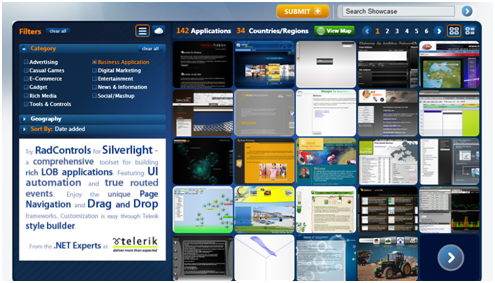
Answer: Um…yes? Again, a lot depends on the specific problem domain. Silverlight has many benefits, and if those benefits seem to apply to the direction your business is going, then it is likely that it would be a good thing to learn. Be careful, however of the old adage “if all you have is a hammer, the whole world looks like a nail.” Sometimes, you really should use a screwdriver. Silverlight is a viable technology, and is being used in many professional scenarios. Unfortunately in answering this I think I gave too many examples of people using the media capabilities of Silverlight (NBC Olympics, CNN Inauguration, etc.) For a showcase of hundreds of actual Silverlight Business applications, please visit the Microsoft Silverlight Showcase and select “Business Applications” from the Category section. Also, Microsoft has put together some compelling data in this application.


Silverlight Showcase Business Applications

There were also a couple of questions about LINQ-to-Entity and EF vs LINQ-to-SQL. There are better sources than me for information on that battle.