NH.Net User Group Presentation Overview

I have to say that I had an absolute blast presenting at the NH .Net User Group last night. It was a good crowd that seemed genuinely interested in the topic and threw up some good questions. I only angered the “demo gods” once, but was able to dig out and keep to my plan for what I wanted to cover in the presentation. With the 2 hour format, I was actually able to cover more ground than I had elsewhere, stating with a bit of “Hello World” and running all the way through authentication and the HTML Bridge.

I have posted the latest version of the presentation slides, code, and “script.” As usual, the script is an interactive PDF version of the mind-map that I use, and it includes hyperlinks to the references for the pertinent topics covered in the presentation. To use it, start at 1:00 and work through the topics in a clockwise rotation. The content is available here.

My one glitch occurred during the Authentication segment – to date the most fragile piece of the whole event. I got aggressive and uncommented too much out of the web.config too early. The result was that I had set things up for Forms Authentication, with Anonymous access disabled. When I went to add the web service reference from the Silverlight Client project, the tool failed to obtain information about the service (because it was trying to request information from the server anonymously.) Once I commented out the anonymous restriction and recompiled, things were working fine.

Now it is time to set things up for Silverlight 3 – I hope to do something at the upcoming Connecticut Code Camp on June 13, which is likely to be my next presentation opportunity.

Many thanks to the audience and especially to Pat Tormey who runs the NH group.

 

New Hampshire .Net User Group

At the Boston Code Camp last week I got to talking with Pat Tormey who runs the NH .Net User Group and he asked if I could bring my Silverlight talk to their April meeting. After he sat through the presentation he was still interested, so it looks like I’ll be holding off on changing the presentation content to Silverlight 3 for a couple more weeks.

I’m really looking forward to this talk. My introduction to the User Group Communities came through the NH .Net User group, back before my daughter was born and when it was meeting in Tyngsboro, MA. I saw some great presentations there, and I think I owe Sam Gentile an apology or two as I asked him about any potential impact to video playback that could be caused by the unpredictable timing of the .Net framework’s GC collections. I got to see some really good speakers talk about a wide range of topics dating back to the beginnings of .Net. It is a great opportunity to try to give something back to this group.

I’ll be presenting on Wednesday, April 15th at 6:30 PM at the Eaton Richmond Center at Daniel Webster College in Nashua (directions.) There’s usually a gathering at Shorty’s off of Exit 6 (next to the Home Depot) in Nashua following these events.

Framework Design Guidelines Second Edition Released


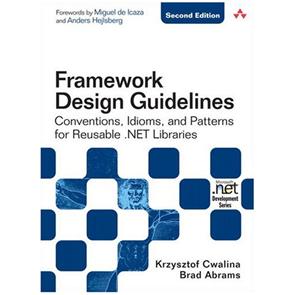
Not exactly breaking news, but the second edition of Krzysztof Cwalina and Brad AbramsFramework Design Guidelines book has been released by Addison-Wesley Professional. This book falls into the “must read” category for any .Net developer, whether they are a member of a large or small team, working on client or server code.

The Guidelines have evolved over time as Microsoft itself has been laying out the .Net Framework, its assemblies, namespaces, classes and other such material. As such, it serves on several levels. First, it provides valuable insight into how and why things are organized the way they are in the .Net framework. Second, it provides invaluable guidance to .Net developers based on lessons learned “in the real world” as to how to approach the layout and content of your own code, not only for intra-team collaboration and external publication, but also for future understanding and reuse of your own code. Not many developers get to work on projects with the size and scope of the .Net framework, so this kind of insight and transparency is rare and extremely valuable.

The book is well written and includes advice in the form of Do, Don’t, Consider, Avoid, etc. with examples mostly in C# but also some VB.Net and other languages mixed in. Also notable are sidebars from various prominent members of the development community adding to the explanation of a presented topic.

My only criticism of the second edition is that the editing process was not thorough enough. Several section references and “later content” descriptions are built around the layout of the first edition of the book (the technical content itself appears complete and accurate.) If you are reading it and appear to have gotten lost when looking for some referenced content, consult the TOC or the Index and the correct information should be easy enough to locate.

The book can be ordered here.

Visual Studio Modeling PowerToys Addin

Until the release of Visual Studio 2010 and the Oslo Modeling platform, dealing with your code visually is either the province of 3rd party tools or you can choose to use the Class Diagram tool in the current edition of Visual Studio.

Until recently I had been favoring the latter approach. Technically, I still am, but I just stumbled into an addin that greatly extends the reach of the tool. PowerToys for the Class Designer and Distributed System Designer is freely available from CodePlex.

After installation, the Class Diagram tool is enhanced with several new features, including:

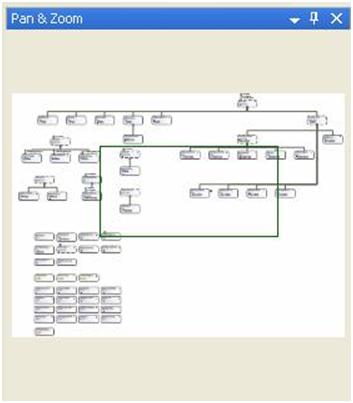
  • Pan/Zoom window for the Class Diagram (similar to Visio and other applications)
  • Find in diagram search
  • Use the Windows Forms designer/layout commands to align modeling elements
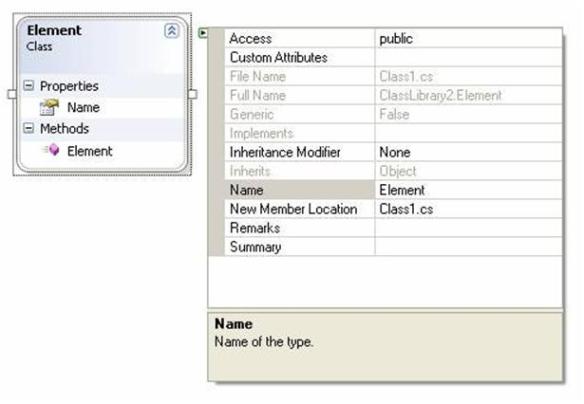
  • Floating property grid for your class
  • IE-like mouse scrolling
  • Double-click to create comments in the diagram
  • Optionally display a positioning-grid in the designer
  • Export diagram for the web
  • Documentation tool window (for XML Documentation)
  • Content Filtering
  • Highlight all members of an interface displayed on the lollipop
  • Drag inheritance and association lines from one diagram item to another
  • More…

Overall, the features provided greatly enhance the functionality provided by the Class Designer. Click here to download or learn more about the tool.

A couple of screenshots taken from the product’s documentation:

Figure 1- Floating Properties Window

Figure 2- Pan & Zoom Window

Free CodeRush Xpress for C#

In case you missed it, Microsoft and Developer Express have announced a new version of the DevExpress CodeRush and Refactor! Pro tools, called CodeRush Xpress. It includes a reduced set of the features that are included in the premier versions of these applications, and it is FREE! (Not that I’ll use it, but this may have been the second valid use of the old and hated HTML Blink tag…)

CodeRush/Refactor! are a couple of developer productivity tools that enhance the Visual Studio 2008 IDE (comparable to JetBrains’ ReSharper application.)

More information about the available features is available here or here. The download link is here.